Often times I have worked with a cinematographer on a TV or platform series when the HDR deliverable issue arose : the cinematographer would go “Oh no, I don’t like the HDR look—I don’t want to re-grade it all—I didn’t light for HDR, i’ won’t look right”.
I am thinking of one time especially, I was involved in a TV series for which the cinematographer had been told to deliver an SDR master only. Then, it was the very last weeks of his color grading, someone from the production company stepped in and said “so, we’ve seen the drafts for the SDR version for now, but you are sure working on the HDR grade also, aren’t you?”.
So the DP and the colourist went on re-doing a complete pass on the whole series last minute. They were very unhappy of the process.
Another time, I was filling in for another DIT on a show where the master was explicitly intended to be in HDR, from the beginning. The cinematographer had requested HDR monitors on set, which he didn’t get for budget reasons.
So he had asked the colourist to develop a look in SDR (that is to say, the colourist had worked with an ACES ODT to BT.1886 gamma 2.4 at the end of his Resolve node tree—the post workflow was all ACES, for VFX reasons) and the DIT was colour grading dailies with this look pipeline and the same ODT.
When came the time of the final colour grading, I came to see the DP and the colourist at the post house. It was one of their very first days. When the DP opened the door to me, he said “It’s a shame, I have lit for SDR, but now all of my highlights are blowing up like crazy, the contrast is all askew. I wish we could deliver the SDR only: that’s my image!”
Of course this all comes down to the main confusion between the look and the format. In this debate, I have to admit that I am a huge follower of Steve Yedlin’s point on view that all a display is capable of doesn’t necessarily need to be enacted in every movie or every frame.
In other words, an HDR display is certainly capable of reproducing a so-called SDR image, right? (Or, to be more precise, an HDR display is certainly capable of producing a perceptual match to any image rendered on an SDR display).
As Yedlin explains it here and there, there seems to be an unquestioned assumption that somehow an HDR deliverable should look different than a SDR deliverable—to sell the HDRishness of it, in a way.
But this situation of having to deliver the same content to two different display technologies is not quite new, is it? We’ve experienced exactly the same for years when delivering a DCP cinema master, and a video copy for TV, DVDs and so on. Do you need to re-grade an entire feature to produce the DVD copy?
Of course not. And why is that? Because it is commonly accepted that preparing a delivery for a cinema projector or for a consumer TV is just a matter of rendering pipelines. Yes, indeed, the physical capabilities of a cinema projector, as stated by the related standards (DCI P3 Specification, SMPTE EG 432-1:2010, SMPTE ST 428-1:2019 and such) are different than the physical capabilities of a consumer TV following the specs of the SDR standards (ITU-R BT.1886). To put it simply, the colour primaries achieved by a cinema projector are slightly more apart, resulting in the possibility to produce some more saturated colours at the extremities of the display capabilities, whereas HDTVs are narrower.
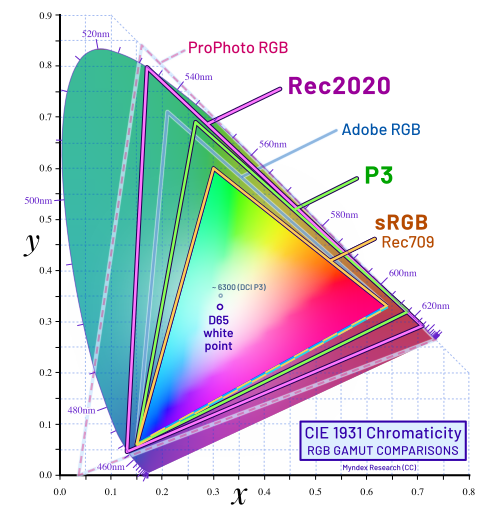
The so-called P3 gamut is wider than the HDTV BT.1886 (often called Rec.709) one. This limit of consumer TV capabilities may have lead to a loss of colour separation, or of colour saturation at the extreme edges of the colour space (depending of the behaviour of the gamut mapping, whether it would compress or clamp the chromaticity values). But it has been considered an acceptable trade-off for consumer deliveries, that didn’t need a specific adjustment other than a dedicated display rendering pipeline.
And then the colour gamut used by HDR displays (ITU-R BT.2100) is even wider than P3 (it corresponds to Rec2020 on the plot above, as ITU-R BT.2100 uses the same colour primaries as the unfortunate and unused ITU-R BT.2020 SDR—yes!—standard). So it should be able to reproduce any BT.1886 mixture of colour then, and even P3’s!
The same goes for contrast curves. It is said that SDR is nominally intended to be viewed with a peak brightness of 100 to 200 nits, and HDR displays can perform white up to 1000, 2000 nits, then they should as well be able to display pixels only bright to the level of 100 nits, right?
Of course the main issue when it comes to contrast curves is that the idea of HDR plots to be indexed on absolute values. So, yes, we can output a white signal of 100 nits, but will it be viewable in a bright environment, since the display renders absolute nits values, and 100 nits is quite low!
Well, first, this problem would be infinite if we consider the opposite: should we produce a deliverable brighter, with a 500-nits white in any circumstance? Pity the ones watching their TV at night, then!
Hopefully, no manufacturer has forgotten to implement brightness control on their HDR displays. So we might as well continue to author a specific contrast, targeted to an arbitrary maximum brightness when targeting HDR displays, and trust that the image may be viewed exactly like on any SDR monitor.
But how do we do it then?
In the past, I have tweaked the output transforms by adding a luminance curve at the end of the colour processing, to squeeze all values below a certain luminance level, and a X-grade or colour wrapper to compress the gamut edges. But this method is sloppy, takes time, and ultimately relies on matching two displays by eye.
Whereas the maths do exist. I mean, all display colourspaces standards presents their primaries and whitepoints characteristics, and their matrices to transform from RGB pixel data to emitted tristimulus values. So should we want to match the same tristimulus values, we only have to reverse the calculations, right?
That’s what I did.
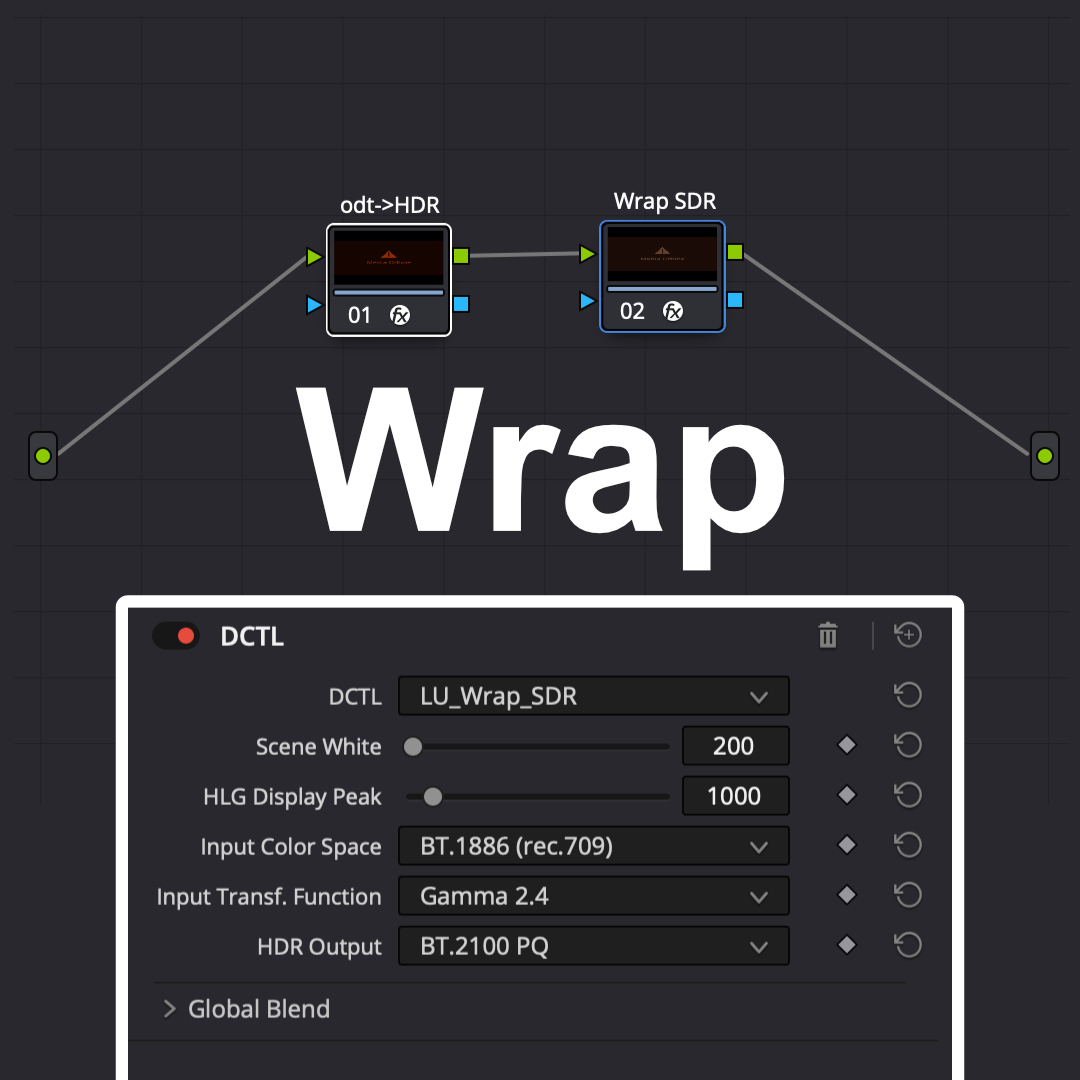
Wrap SDR is a DCTL for DaVinci Resolve that allow you to wrap your SDR deliverable in an HDR pipeline.
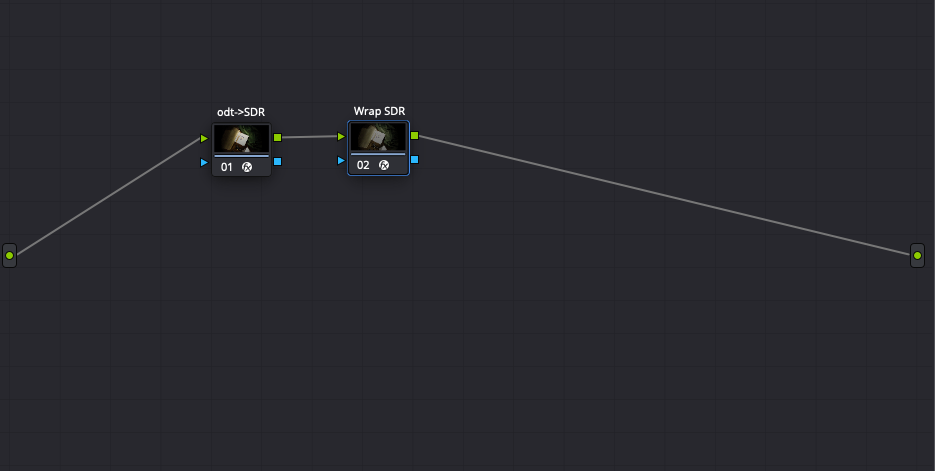
How does that work? Quite simply.
You have an SDR output transform already at the end of your pipeline, whether it be an ACES or DaVinci transform, a constructor Look-Up Table, or some creative LUT with the output transform built-in (although, please, don’t do the latter). If you’re happy with this creative result, all you have to do is to append Wrap SDR after this display transform.
In DaVinci Resolve, this means precisely that you have to perform your colour-managment in nodes, as Wrap SDR needs to work after your SDR display transform. Yes, it’s not the most convenient, but as it happens, it is becoming kind of a trend, somehow.
After the node that converts your scene-refered data to any SDR display-referred flavour of yours (ACES Transform, DaVinci Resolve CST, display LUT…), pipe those SDR pixels values to another node containing Wrap SDR.
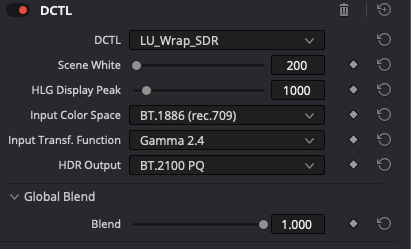
The settings are quite straightforward:
- Input Color Space: Set this setting to the SDR colour space that your previous node is outputting (i.e. the SDR target you were mastering for)
- Input Transfer Function: Set this setting to the SDR transfer fonction (so-called: “gamma”) that your previous node is outputting (i.e. the SDR “gamma” you were mastering for)
- HDR Output: Set this setting to the HDR standard you are supposed to be delivering to.
- Scene White: Inspired by Steve Yedlin’s calling of a target maximum brightness to author your contrast, the Scene White setting (in nits) is used to define the target brightness of white on an HDR display. If you were working on an SDR display maxed at 100 nits, you might want to set this to 100, to achieve a perceptual match out-of-the-box. Keep in mind though that with Wrap SDR your relative contrast will be scaled from 0 to Scene White, and that despite what we’re told, users will dim or brighten their displays… Just like in SDR, actually.
- HLG Display Peak: If you are mastering to an HLG display, you will need to set here the peak luminance of the display in nits. Indeed, the HLG standard is even more painful than PQ, as its supposed absolute luminance mapping is itself relative to a given maximum brightness of the display. So yes, you will need to render a different deliverable for each peak luminance intended (500, 600, 1000, 1600 nits…). Fortunately, nobody seems to do HLG deliverables for real.
- Blend: Finally, if you want to keep a little of those twinkly highlights from HDR, you can decrease the amount of blending of this Wrap SDR effect. This behaves similarly to Steve Yedlin’s Scorch effect.
Note that although all colour management is happening in your nodes, and not in your Project or Timeline settings, I would still strongly advise you to set the Output colour space correctly in your Timeline and/or Project for two reasons:
- For correct signal tagging when monitoring your timeline (the color space specified in Project’s or Timeline’s Output color space setting sets the reference of the standard that DaVinci Resolve uses to talk to your display, whether it be your regular laptop screen or an external SDI monitor).
- For correct deliverable tagging. Although you can always set this when performing your Render, having the correct settings from the beginning always helps reduce the chance of mistaking.

Wrap SDR is published on Github