Magic Rec Flag is a free macOS app that starts and stops recording in your video assist or grading software by watching for a camera’s red tally in the picture. It’s built for the cameras that don’t send a proper SDI rec flag.
Where the idea came from
It started with an annoyance. We see more and more cameras on shoots these days that don’t send a rec flag or any of the usual SDI data: DJI drones, the DJI Ronin 4D, iPhones, GoPros… Every one of them means someone rolling record both on the camera and in playback systems, by hand. I wanted those takes to start and stop on their own, in the software we already use every day: Livegrade, ReelTime and QTake.
So that’s what Magic Rec Flag does. It doesn’t record anything itself, but rather tells your existing recorder when to roll.

How it works
Magic Rec Flag watches a small area of a live video feed, the spot where the camera shows its red REC tally. When that area turns red, it presses your Record shortcut in the app of your choice. When the red goes away, it presses Stop.
- It looks for real red. Detection ignores greys, whites and shadows, and a sensitivity slider sets how much red counts as “on”.
- It waits a beat. The red has to hold for a few frames before anything fires, so a single flicker won’t roll a take.
- It shows you its state. A small badge stays on top of your other windows, showing STBY or REC, with a Stop button.
Sending a keyboard shortcut is crude, but it’s universal: if your recorder has a Record hotkey, Magic Rec Flag can drive it.
Setting it up
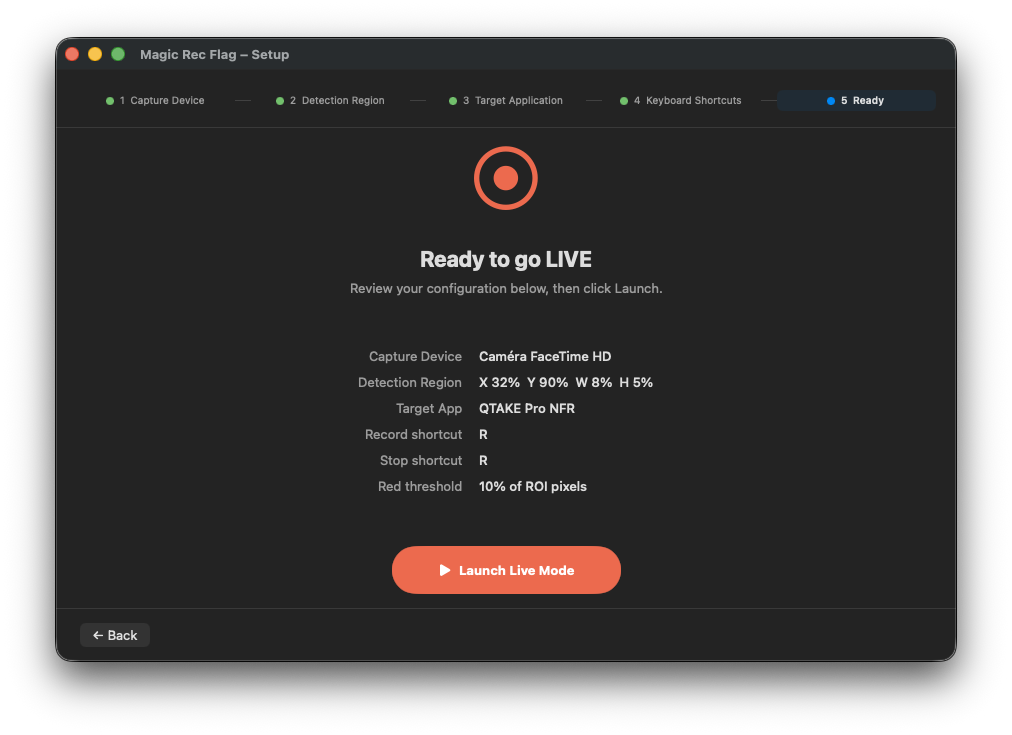
A short wizard walks you through five steps on first launch, and remembers your choices for next time:
- Pick a capture device. A Blackmagic DeckLink or UltraStudio, or any camera input macOS can see.
- Draw the detection area over the live preview, right where the tally appears. Keep it tight.
- Choose the target app, the one that should start and stop recording.
- Set the Record and Stop shortcuts to match that app’s own.
- Go live. Start or stop live mode, which watches the feed and fires the shortcuts.
Does it work?
I’ve just come off two months on a fiction shoot with it. The setup was a four-channel QTake fed by two AJA Io 4K boxes, plus a Blackmagic Mini Recorder.
Whenever we had a drone, I patched its feed into the Mini Recorder and pointed Magic Rec Flag at it. The drone shots then rolled in QTake alongside everything else, with nobody hitting record by hand. It was very satisfying.
Known limitations
- You need a dedicated capture device. The feed Magic Rec Flag watches must always be live. If it watched a feed that can also show playback, replaying a take with the tally on screen would roll record.
- The target app jumps to the front. To receive the shortcut, the recorder briefly becomes the active app each time record fires. It’s a bit inelegant, but it works with anything. I’d like to send record commands at a lower level, though with QTake, for one, I’m not very hopeful.
Get it
Magic Rec Flag is free and open source under the MIT license. Download it from the Releases page on GitHub, where you’ll also find the full instructions.
It runs on macOS 13 Ventura or later, on Apple Silicon or Intel. A few things to know before your first launch:
- The usual quarantine trick. I’m still not an officially recognized Apple developer, so macOS will block the app at first. Clear the flag once in Terminal:
xattr -dr com.apple.quarantine "/Applications/Magic Rec Flag.app" - Desktop Video for Blackmagic devices. To use a Mini Recorder or any DeckLink or UltraStudio, install Blackmagic Desktop Video. As usual.
- Accessibility permission. Turn it on for Magic Rec Flag in System Settings, under Privacy & Security. Without it, the app can see the tally but can’t send the shortcuts.

Magic Rec Flag is published on Github